Google photos + that ecosystem sucks. If you're on android, you should move away from it. Here's how.
- Install a separate app which uploads everything in the folders you choose to any S3 file storage host. This covers your phone. There are also uploaders for your pcs/laptops etc.
- It costs like 7$/month for a terabyte - not much at all.
- S3 is just a protocol; lots of companies support it (AWS, Backblaze, etc.) and it's really cheap for long-term storage
- Anything that shows up in the folder you monitor is auto-uploaded, privately, to your s3 bucket
- Then, you have a feed of all your new photos as they come in, plus you can do things (query, etc) against your old ones, too.
- Generally you'll probably have an AI-written program locally which downloads them all to your PC so you can look at them, have the AI do things with them easily, etc.
- I also modified the exporting program (w/ai) to NOT strip the GPS information from the photos you took. So they're mappable too and you don't have to use google's restrictive mapping setup.
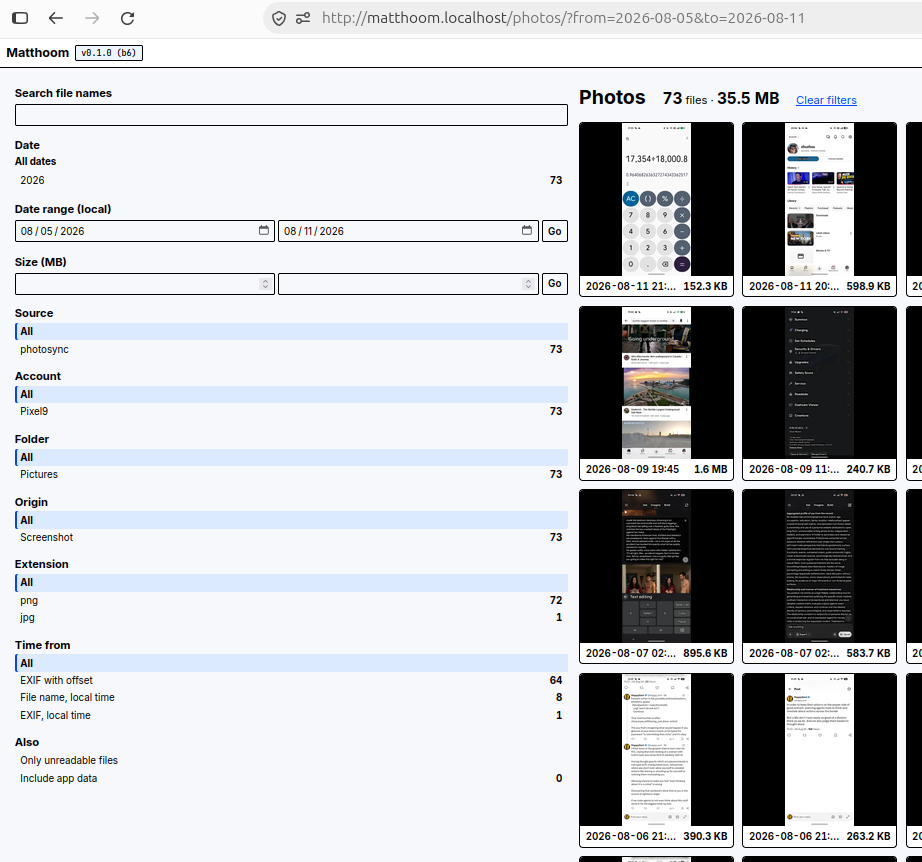
I haven't iterated much on the viewer, but this is what my AI-made naive local version looks like so far.
What can you with this
You get 1) the ability to have a complete or partial copy of all of your images 2) the ability to iterate over some query of all your images in a program (i.e. a program you+ai wrote, which downloads your images meeting the params you like, and does something with them.
- A feed of all of my own new photos is super valuable for making cool apps that reprocess them live, or identify interesting things in them, their geolocations, people in them, etc.
- A feed of all my OLD photos is also super valuable for say, figuring out when/where all your images were taken and fixing all the dates (by whatever you're into; even the wallpaper in the background)
- As is being able to query them all by any property, which it can also show to you - not like how gphotos hides all the useful data about them like resolution, camera ID, etc which is in the EXIF or normal querying by date, geocode, resolution.
- If you do some pre-processing, for object identification or anything available today or in the future, you'll be able to query against that.
- Automatically detecting screenshots and cropping them; this always seemed fun, to just crop out the garbage like power levels, notifs from other apps, etc. Or to crop IN strange values too like 0% power, notifs from nonexistent software.
- Automatically reflowing bad aspect ratio text screenshots. You know when someone screengrabs something but it's super short and super wide and a huge pain to read? AI can just automatically make a Twitter-shaped portrait version of this so it reads perfectly. And it'll basically be letter perfect. Until Twitter does it automatically, we can do it for them.
- Automatic annotation of images - if you have a class
- Automatic classification and removal - e.g. I often take photos of receipts; they hang around in my main gphotos stream weirdly. I am doing this because I knew the day would come that making this into something useful would be pretty easy: just tell the AI to do it. That day has come: one day soon, I'll create a processor which'll iterate through every old photo, classifying them and once we've cleared history, will only be re-called when new photos show up. It'll be in charge of identifying the basic type of an image: one I downloaded (family photos, art background type stuff), ones I took (subcategories, pictures of my cat, receipts w/prices etc) and put them into collections where I will control whether each one does/doesn't appear in default future searches, whether it's used to make memories, whether it's part of an ai image generation experiment, whatever. 8. Tons of things like this; splitting them into screenshots/my actual photos/downloaded things/etc using tons of actual intelligence, and also choosing how they show up again (do or don't) for searches, browsing my photos by day, etc. So photos become just another useful type of datastore. 9. another fun one would be to identify images taken in the same place at the same angle over time, and then automatically constructing before/after views by finding the proper overlay alignments to highlight the difference & similarities
How do you do it?
First, set up your S3 host
Then install Exfilac
You can choose the original (loses GPS data in photos) or my fork (preserves it, plus some other changes like making it handle skippable folders better).
The standard one is in the F-Droid app store (free) called Exfilac. It uploads everything from the folders you pick to an S3 host. That's not just AWS; S3 is a protocol and lots of companies implement it. It's very cheap, and is used for long-term storage and for serving images. Pre-AI I had never quite gotten this standardized to use within my projects but it is nice since it's universally available and doesn't take up disk on your actually-online servers. I now would use it regularly for any project which has both large binary format data, and which has to be online. The cost of serving things like that from s3 hosts vs having them taking up live disk space on your VPS or droplet or whatever is very much in favor of S3.
But Android goes very, very far out of its way to strip GPS from photos for some reason
I'm not sure why. I guess in the name of privacy, fine. But it goes FAR and makes it very hard to get your photos out with EXIF geodata intact.
Even the default Exfilac, which seems to have raw disk access, is actually being given the images with zeroed out. So to get it, I had to fork Exfilac into a new version, Exfilac GPS and reinstall it. You install the app, set up the folders and how they are synced, set up your bucket where they'll be received, and there you go; when it can do uploads (wifi, power, whatever) it'll do the uploads and keep your S3 bucket updated.
What does this enable?
Imagine running programs which see every new incoming image or file you send from your phone. They'll be able to modify the file, or at least send in a new
On your phone you can still have a stream of photos available locally; in the old world it was always a pain deciding when to "free space" since once they were in gphotos they were SO much harder to get at; but now that'll be done, I think. Any edits made by my programs can be sent back in to appear again as on-phone images, easily usable in any app.
They can do things like:
It isn't just photos.
It's also videos, MP3s and WAVs I record, which can be sent to processors to transcribe them and look for whatever, notes, diary entries, etc in them.
As a later step, I can set up local caches (a disk with all/some checked out, and with some analysis already preemptively done) and this would expose an API which live requests can call; e.g. my general web chat with Claude or a local Claude chat can interface with /searchMyDocs(type: PHOTO, dateStart: null, dateEnd: null, subject: "cute puppy") in any way, and with any of many many more parameters than this.
Google photos takes all your photos and doesn't let you get at them very well, and it also only offers limited support for doing things with them, too. And Android locks you in, so the process of automatically uploading all your images to google is pretty much the only way you can reliably back up and get web-viewing access to your photos, too. This is not a good situation because you're trapped, and because the actual editing tools they give you are really bad.
More detailed list of reasons to get away from GPhotos
- The social support in gphotos was never developed much after the initial push (which I think that old failed google circles thing's failure ended), so it's not good at allowing much sharing like with family, friends, etc after a group trip, for example. it's okay at it but the features are really limited.
- It doesn't give you any API method to get at your original full size images
- The tools for viewing, searching, and editing them are full of bugs
- The google uploader on is Android flaky, and the ones for desktop / laptop are much worse; they seem to keep failing or being deprecated.
- In the web viewer, they add an unremovable dark gradient imposed on every single image. The way the photos keep appearing and disappearing as you edit them, for pretty much no reason, etc.
- There are 100% repro bugs on production for over 5 years for when you do a search in the photo stream, then view an image somewhat down the page. Perhaps you can archive it or edit it. Then click the back arrow to return to the location of your search. The page will die due to a timing bug and you'll be pushed back to the top of the search result page (which potentially is very long). Tons and tons of things like this.
- They do have awesome new AI editing related stuff but the site overall is more like an way to show off their AI and visual technology. I've been "the guy who maintains the really old site" and have felt the difficulty of motivating an entire org to fix a huge ponderous blob of 10-20 year old code, and been there as those old libraries just keep living on rather than getting replaced. Unfortunately, that's gphotos now
- Once they get a hold of your photos, they keep them forever and it's very hard to either get access to any single photo, and also hard to get all of them and use any other system.
- The way this+google drive works, too, ends up with all your files in a huge mess inside drive, leading to constant disk space pressure and up-sells to pay for more gigabytes there.
- They do have APIs to access your photos but only in google-chosen sizes, but the only way to get the originals is to use Google Takeout to request they prepare a huge archive for you; this comes out as say 90GB of zip files, which you then have to download and sort through yourself. Really crazy.
- Google Product Bugs Long ago I made this channel to document some of the bugs in the UI. Nearly all of them are unfixed, lo, these 5 years later!
Status: Working (October 2026)
I now have it uploading all my phone images (and files) and also have a verison from my other comps too. The reader is personal and not shared at this point. I think within a few years most people will just have their AI assistant do this kind of thing automatically on the fly for them.